
Native Video Player
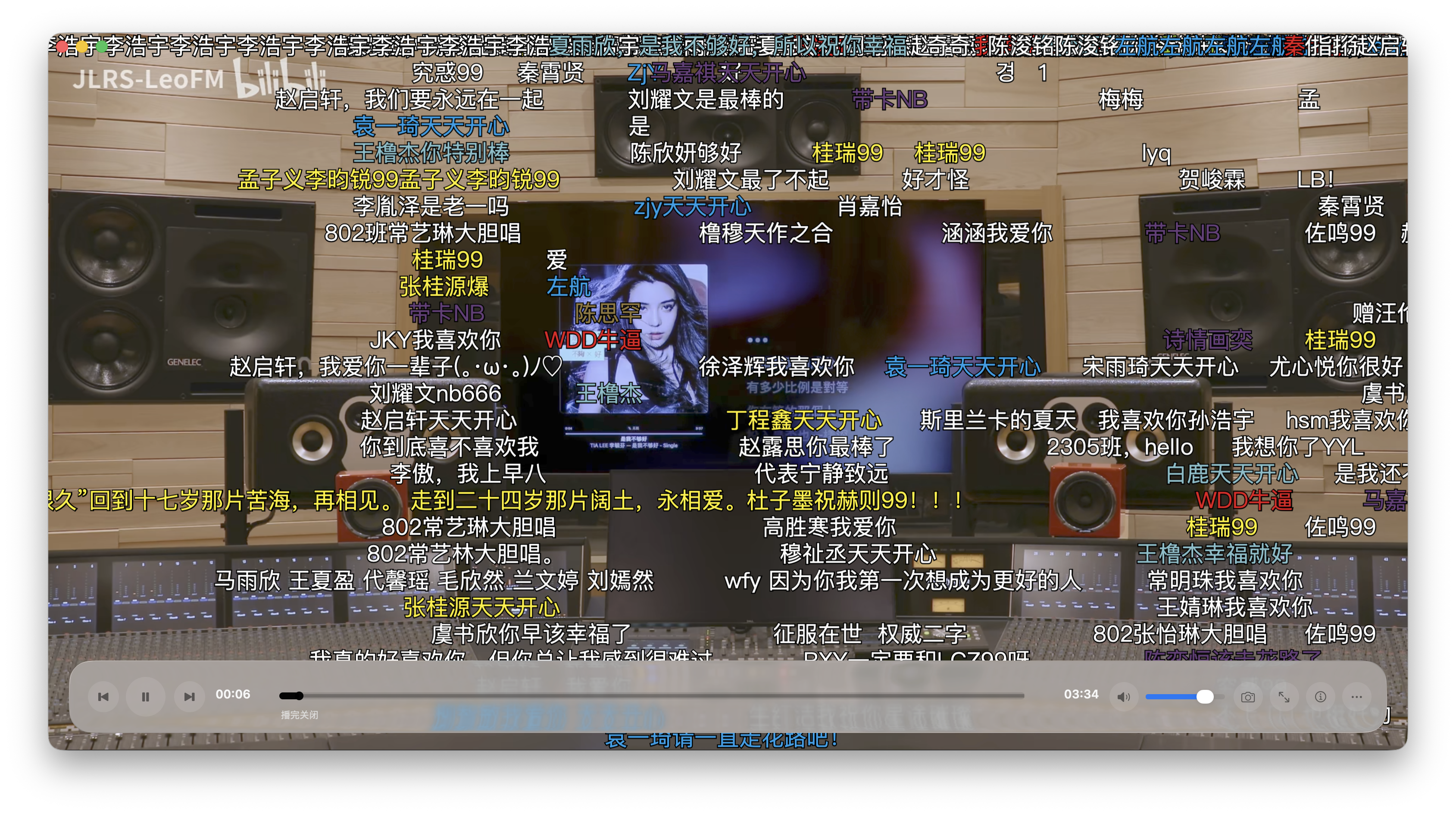
The media library includes a built-in video player for watching local videos scanned into the library, and it also handles Bilibili online playback. It supports danmaku, timeline thumbnail previews, episode playback, and Touch Bar control.
Danmaku ≠ subtitles
The player has built-in Bilibili danmaku (comments scrolling across the screen), not .srt / .ass subtitles. External/embedded subtitles are not supported yet — see Not Yet Supported at the end.
Accessing playback
Local videos in the media library
- In the media library "Manage" section, add a directory containing videos and scan it (recognized by file extension — see Supported Video Formats).
- Scanned videos show cover art, resolution, duration and more, and appear on the media home / detail / library pages and in watch history.
- Click a video to open it in the player window; starting playback records one watch-history entry.
Episodes / collections
Multiple episodes in the same collection play as a queue, and you can switch Previous / Next episode from the Touch Bar strip (see Episode playback & Touch Bar).
Bilibili online videos
Online Bilibili playback uses the same player. Bilibili videos finished via Bilibili Video Download are local files — once their directory is scanned into the media library, they can be played here too.
Playback controls
The bottom control bar includes:
| Control | Description |
|---|---|
| Play / Pause | Toggle playback |
| Rewind / Forward | 5 seconds per press |
| Current time / Duration | MM:SS display |
| Progress bar | Draggable seeking; shows cache progress during online playback |
| Mute / Volume | Mute button + volume slider |
| Snapshot | Save the current frame |
| Fullscreen | Enter / exit fullscreen |
| Stats | Overlay codec, bitrate, buffering and other playback info |
| More menu (⋯) | Danmaku, timed close, always-on progress bar, etc. (below) |
Keyboard shortcuts
| Key | Action |
|---|---|
Space | Play / Pause |
← / → | Rewind / Forward 5s |
↑ / ↓ | Volume up / down |
M | Mute |
F | Toggle fullscreen |
I | Stats overlay |
Danmaku
Control danmaku in the More menu (⋯):
- Show danmaku: Turn danmaku on / off
- Danmaku font size: 50% / 75% / 100% / 125% / 150% / 200%
- Danmaku font: Default, PingFang SC, Hiragino Sans GB, STHeiti, STKaiti, Yuanti SC
- Supports scrolling, top-fixed and bottom-fixed modes; opacity, scroll speed, and on-screen area are adjustable
Preview & cache
- Hover preview: Hovering over the progress bar shows a thumbnail of that time position
- Cache progress: During online playback, the progress bar marks cached, downloading, and failed segments, so you can see how far you can smoothly seek
Snapshot
Click the snapshot button in the control bar to save the current frame.
More menu
- Timed close: Off / when finished / 5 / 10 / 20 / 30 / 60 / 120 minutes
- Always-on progress bar: Keep the bottom progress bar permanently visible
- Technical info panel: View codec, bitrate, buffering and other playback info
Episode playback & Touch Bar
- Continuous playback: A collection / series plays through in order
- Touch Bar strip: On a Touch Bar–equipped Mac, the Touch Bar shows progress and offers Previous / Next episode; availability is decided automatically by your position in the queue
- For single-file playback, prev/next are unavailable
Supported video formats
The library scanner recognizes these video files:
| Format | Extensions |
|---|---|
| Matroska | .mkv |
| MP4 | .mp4 .m4v |
| QuickTime | .mov |
| AVI | .avi |
| Windows Media | .wmv |
| Transport stream | .ts .m2ts .mts |
| DVD | .vob |
| Flash Video | .flv |
| WebM | .webm |
| RealMedia | .rmvb .rm |
Not Yet Supported
The following are not currently provided:
- Subtitles: No
.srt/.assexternal or embedded subtitles (danmaku only) - Quality selection: No quality / bitrate switching
- Variable speed: The speed menu keeps the rate steps, but only 1.0× normal speed currently takes effect
- Picture-in-picture / loop / background playback / resume-from-position: Not yet implemented
- Zoom mode, hardware-decode toggle, intro/outro skip: Placeholder menu items, not yet enabled